
Vital symbols for the baby monitor function
Symbol explanation

sticklett support
Last Update a year ago
The MARY ladybird uses intelligent algorithms to detect whether your child is asleep or awake, lying quietly or actively romping around based on their movement behaviour. It allows you to monitor your child's sleep without any sound or video and to be informed automatically when your child wakes up. We differentiate between two movement patterns: position and activity.
The activity (degree of movement) in conjunction with the position (body posture) provides information about the child's current movement behaviour, e.g. is it sleeping, how is it sleeping, is it awake, is it playing in the room, is it walking or standing, is it sleepwalking, etc.?
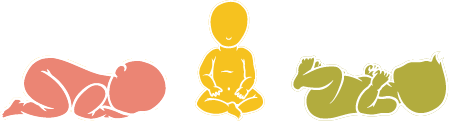
POSITION DISPLAY (POSTURE)
Three symbols are displayed for the position:
- Lying position (green) - includes both the supine and lateral position
- Prone position (red) - alerts you if your child turns onto their stomach while sleeping. If your child is generally a stomach sleeper, we recommend deactivating this alarm function.
- Upright position (yellow) - includes the standing and sitting position

DISPLAY OF ACTIVITY (DEGREE OF MOVEMENT)
During activity, the two symbols show you whether your child is
- Active (yellow), i.e. your child is lively and already active in the cot or room.
- Quiet (green), i.e. your child is sleeping and therefore not moving much.
This function is particularly useful if your baby is rather quiet and does not draw attention to itself acoustically.
To view the values, simply tap on the position or activity in the Home view and take a look at the movement history for the day.As always, you can customise which functions you want to be notified about in the app. You can activate or deactivate the alarm settings under Menu --> Settings.